



 This week FRC has been sent OneForAll’s flagship Universal remote for review, here are our thoughts…
BRAND – ONEFORALL PRODUCT – XSIGHT TOUCH TECH – TOUCH SCREEN UNIVERSAL REMOTE & RF EXTENDER AMAZON – CONTROLLER / RF EXTENDER
A little while ago we were lucky enough to be sent the OneForAll Smart Control Motion for a review, and though it had it’s limitations on a big set up, we were very impressed. Well this time OneForAll have sent us their flagship controller to put through it’s paces. But will it be able to keep up with the large amount of macros needed to control a high-end home cinema? Let’s see.
Well I want to start with the price of the remote, at just under £100 (£96.88 ON AMAZON) it isn’t the most expensive controllers out there but it does put it up with some of the big boys out there.
In the box you get a USB cable and user software CD-ROM to connect it to your PC (Macs are not supported) if you wanted to set it up that way, although it is possible to set the controller up completely on it’s own. Also you get a snazzy base station for you to dock the controller in over night or when it is not in use which always keeps the Xsight TOUCH charged. I love this as the worst thing ever is to be watching a film and have the controller fade away and have you scrambling around for batteries.
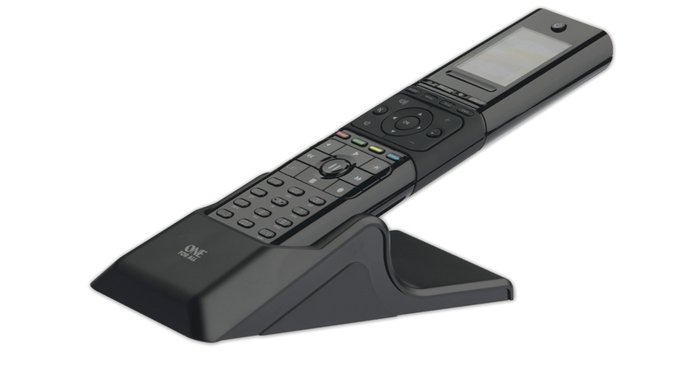
The controller itself can control up to 18 devices, from 2800 different home entertainment and home automation brands, so it is very likely that your TV, DVD, Satellite and even your light switches will be able to be controlled from this one unit. Another nice feature of the remote is the fact that it has RF (Radio Frequency) built-in, so if your kit has RF capability you can control your system without line of sight.
The Xsight TOUCH is very pleasing on the eye. It is made from good quality plastics and features a 2.2” LCD full colour touch screen and a touch responsive slider to navigate through different screens. The bottom half of the remote is set up like a  standard controller, with controls like play, pause, guide and colour buttons.
Setting up the controller without a PC is actually a lot easier than I thought it was going to be. With a few button presses you can get the controller to find your TV Brand and correct frequency to control it. The set up is even easier when you use a PC. A simple install of the software and connection to the remote via USB will have you setting up all your devices in a matter of minutes.
A nice feature of the Xsight TOUCH is the abilities to set up ACTIVITIES. This means you set it up with a number of macros to control a number of devices at the same time. For instance, I want to watch a Blu-Ray – I press the Watch a Film activity, and it will turn TV on, Turn Amp on, Turn Blu-Ray player on and make sure all the devices are on the correct setting. Programming these ‘MACROS’ into the controller is very easy with the provided software.
Another nice feature is the added RF EXTENDER that you can buy to go along with your remote. It fits nicely away in a cupboard and with the added cables attached can control all of you your kit even if it is tucked out of sight in a cupboard. Which is something that lots of Home Cinemas strive for.

There are some points of the controller that I do think do not work so well. The touch screen and slider can be a bit flakey at times and are not quite as responsive as I would hope for. But if I am honest I am picking slightly as overall the Xsight TOUCH is a great piece of kit. I have been really putting it through it’s paces over the last few weeks and it has coped with everything I have thrown at it, I am very impressed. And this is from a person who is very fond of another brand of Universal remotes.
FRC Rating
ONEFORALL XSIGHT TOUCH IS AVAILABLE FROM ALL GOOD RETAILERS NOW
Like the review? Want to buy the Remote? Why not visit our store for the latest price
Are you a universal controller fan? What about the RF features shown here? Comment below…
More From Custard
- DVD Review – A Film With Me In It
- Tech Review – OneForAll SmartControl Motion Remote Control
- Tech Tuesday – Sennheiser RS 170 Headphones Review
Custard Recommends
- Film Review #73: Crocodile • Tweedle Dee and Tweedle Dave (The World According to Dave)
- Film Review: The Closet (The World According to Dave)
GD Star Rating
loading...




























24 Jan 2012, 11:21 am
Looks a bit like the Harmony One. Have been using that one for ages and will be for a while. Nice to see what other brands are doing though
loading...
loading...
25 Jan 2012, 10:56 am
I must admit, I am a big follower of the Harmony remotes. But this one is a good equal to THE ONE, in build and functions.
Thanks for the comment matey
loading...
loading...
24 Jan 2012, 9:19 pm
wow.
wasn’t expecting the score you gave this one. We used to sell it at my store, but most people (including yours truly) prefer the Harmony ONE of the Harmony 900.
We had so many of the Xsights break and/or get returned that they eventually pulled them from my assortment.
I liked the price and the capability. I chalked it up to operator error at the beginning (most people use the manual as only a paperweight instead of actually reading it), but after a while it began to be a standard: any sold, expect to see back shortly and exchanged for a Harmony.
I am glad that you like it so and I hope it continues to be a great option. I wanted to see the brand take a bit of the remote control market pie and hope they can come back to my assortment soon.
loading...
loading...
25 Jan 2012, 10:58 am
Thanks matey, as I mentioned above I have been a fan of the harmony remote for a long time. But this oneforall seems to have finally upped it’s game and it is a good contender. The set up is easy, even for my complicated home cinema.
Thanks for the comment my friend
loading...
loading...
24 Jan 2012, 9:56 pm
Looks good, just a shame that macs aren’t supported. At least it’s easy to set up without a PC (we don’t own a PC, macs all the way in this household) but probably not one we’d go for as we run most things through the PS3. Very informative article though Scott!
loading...
loading...
25 Jan 2012, 11:00 am
I am the same Amy. We are totally MAC based as well. But for work I do need some PC software, so I have a windows emulator on there. Which made setting this up easy.
Thanks for the comment my friend
loading...
loading...
25 Jan 2012, 3:52 am
Wow, I’m sure my hubby would love to get his hands on this
loading...
loading...
25 Jan 2012, 11:01 am
I am sure he would, who doesn’t like a backlit controller with a touch screen
loading...
loading...
25 Jan 2012, 5:02 am
Jeez, you must have tons of electronics to need one of those Seems like a nice gadget but I would never have any use for this ahha
loading...
loading...
25 Jan 2012, 11:02 am
I do have a lot of kit in the cinema Castor. It is my sin!!
Thanks for commenting
loading...
loading...
25 Jan 2012, 5:30 am
That looks like quite the fancy remote. If I ever decide to upgrade, I will keep this one in mind. Thanks for the intel, Scott!
loading...
loading...
25 Jan 2012, 11:03 am
You are very welcome Eric. I am always glad to pass on some knowledge
loading...
loading...
25 Jan 2012, 7:28 am
Yeah I am in Castor’s boat, looks like a really cool remote but if I had it I wouldn’t even know what to do with it
loading...
loading...
25 Jan 2012, 11:04 am
HAHA I understand matey. but it is fairly friendly. Plus it is nice not to have 3 or 4 remotes cluttering up the sofa!!
loading...
loading...
11 Apr 2012, 6:05 pm
Hi,
I am an electrician and install flat screen TV’s and DVD players etc, but I also install RF controlled lighting units etc. I am currently searching for an answer to a question on this model.
I have bought one on the understanding that it will send out RF codes too, and i’m hoping to recommend it to my customers to control lighting as well as other peripherals, but I cannot see any info on this so far, and wondered if you could enlighten me?
All I can find is the RF extender which is useful but not what I want.
Thanks,
Kev
loading...
loading...