
Tech Tuesday – How to set up a CinemaScope Screen
It’s Tech Tuesday again and this week Ted S talk us through how to set up our own CinemaScope Screens at home.

Last week’s tech article was about what you need to know before you purchase a projector, well for this week I’ll go over how to set up your screen in true cinemascope widescreen. Let’s say you’ve just bought a brand new projector and really excited to watch your favorite movies on a bigger screen than your old 50 inch TV; but one thing that still bugs you was the black bar on top and bottom of the screen when watching films that were shot in 2.35:1 or 2.40:1 ratio. In this article I’ll go through the steps on how to set up the cinemascope widescreen correctly so you won’t see those darn black bars on top and bottom of your screen again.
Before I do that, let’s go over the screen ratios commonly used by filmmakers these days. Today most filmmakers would shoot their films in either widescreen 2.35:1/2.40:1 or in open matted 1.85:1 ratio. When you watch films that were shot in 2.35/2.40 on your regular HDTV, you’ll see the black bar on top and bottom, while films that were shot in 1.85:1 will fill up the entire screen. Some director prefer to shoot their films in only widescreen 2.35 ratio, John Carpenter, George Lucas, David Fincher and Chris Nolan just to name a few. Other directors like Paul Verhoeven and Guillermo del Toro only shoot their films in the open matted 1.85:1 ratio. Then there are some who likes to mix up the screen ratio when shooting their films, Steven Spielberg, James Cameron, Peter Jackson, Martin Scorsese and Ron Howard are a few famous names. These directors have their own reasoning as to why they would shoot their films in either 2.35 or 1.85 ratio. If you would like to learn more about the differences in screen ratio, please go here. Another screen ratio you have to keep in mind is 2.20:1, this is the ratio for films that were shot in 65mm and projected on 70mm screen; there aren’t any films shot in this ratio within the last decade or so, some of the famous films shot in this ratio were Lawrence of Arabia, 2001: A Space Odyssey and Patton.
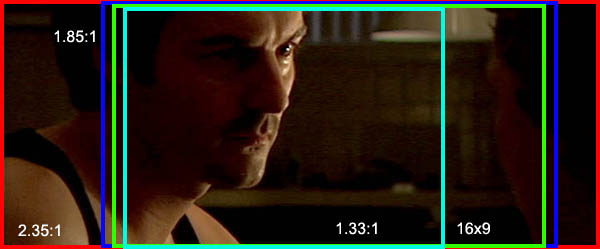
The reason I went over the different screen ratios is because if you’re thinking of setting your projector screen in cinemascope 2.35:1, you have to know which film will fit on your screen and how to correct your screen for films shot in 1.85:1 or 2.20:1. To get started, you’ll need a nice projector screen, I would recommend getting a screen that’s 100inch or larger to really experience the ultra-widescreen. You can purchase 2.35:1 screen online, paint your wall or buy a 16:9 screen and mask it to 2.35:1. Here’s a good example of how the screen will look once you set up everything correctly. Of course your set up will probably look different than that home theater but you have a good idea of how it will look once you’re done. Personally, I set up my screen at 2.20:1 since I love watching 70mm films. To see my set up, please go here.
So now that you’ve installed your nice widescreen, you’ll fire up your projector and watch movies on it. Not so fast, since most projectors can only project 16:9 pictures, you have to figure out how to fit the 2.35/2.40 image on your screen. There two methods to do this, one is the zoom method and the other is with anamorphic lens. Let’s go over each method in more details.
The Zoom Method
The simplest and least expensive way to fill a 2.35:1 screen is to adjust the projector’s zoom so that the sides of the movie image fit the sides of the screen. Any black letterbox bars should spill over the top and bottom of the screen. For narrower content, reduce the zoom so that the top and bottom of the image fill the height of the screen, then draw in the side masking. No special hardware or equipment is needed. Make sure you have dark fabric above and below your screen so you won’t see those black bars that have spilled over the screen. Zooming might be a hassle for those who’ve installed their projector on the ceiling and if the projector doesn’t have electronic zooming function. You have to manually zoom in your image when watching a 1.85:1 film then zoom out for 2.35:1 films. If you prefer to install your projector on the ceiling than I’d suggest you buy a projector that has electronic zoom function, Panasonic’s been selling their PT-AE models the last couple of years, they’re great and cheap compare to other brand. Also, Panasonic PT-AE3000 & 4000 has memory function built in. With one click of a button, you can zoom back and forth between 2.35 and 1.85 ratio, pretty cool function if you ask me.
Anamorphic Lens Method

As an alternative to the Zoom Method, cinemascope widescreen users may place an anamorphic lens in front of the projector. This lens will convert the 16:9 video output from an HD projector into a Scope shape. Anamorphic lenses are divided into two categories: horizontal expansion or vertical compression. Both types achieve the same desired result, just using different methods. This method is very expensive because anamorphic lenses can cost you anywhere from $3,000 to $10,000, so I don’t recommend this method to novice home theater users. The anamorphic lens option is meant only for professional installers and people who have lots of cash to spend. So if you’re rich, by all means go with this option and feel free to ask me any questions before you install your lens. But I’m guessing if you have a lot of money, you can just hire some professionals to install it for you, so you probably won’t need my advice.
Personally I use the zoom method, it’s cheaper and films looks great on my 2.20:1 screen. Another option you can use is to buy a video processor, like this one here. This video processor use to cost over $3,000 but you can find one online for less than $1,000 now. The advantage of a VP is because you can tell it to display any aspect ratio on your screen. For example, if you have a film that was shot in 2.20:1 but you want it to fit on your 2.35 screen, you can tell the processor to output the 2.20 image as 2.35. I’m actually in the process of purchasing that exact video processor myself, I need it to mask out IMAX sequences from films like The Dark Knight, Tron: Legacy and soon Mission: Impossible: Ghost Protocal. Currently when I watch one of these films, the IMAX sequences would spill over my 2.20 screen and it gets kind of distracting.
Well that’s it, if you’re going to install a 2.35:1 screen in your theater room and have more questions, please feel free to ask them in the comments section. I know it’s a lot of work but once you’re done and see films in ultra-widescreen at your own home, you’ll love it.
More From Custard
- How to get the most from your Front Room Cinema
- Tech Tuesday – Surround Sound and Ways to get it Part 1
- Tech Tuesday – Surround Sound and how to get it, Part 2
Custard Recommends
- Excerpt: Secret Confessions of a Backpacker (Laura Watts) • Tweedle Dee and Tweedle Dave (The World According to Dave)
- How to Eat a Cheeseburger in One Bite! (boredstomp)










12 Jul 2011, 11:07 am
Thanks Ted for this one. I really want to have a 2.35 screen but I am still trying to convince the Mrs that we need to upgrade the projector this year. So I don’t hold up much hope for getting a dedicated room with a fixed screen LOLz
Thanks again matey
a WordPress rating system
a WordPress rating system
12 Jul 2011, 3:28 pm
You bet, yeah a true widescreen really does add another dimension to the way you watch films at home. But of course it’s a lot of work and you need a dedicated room to fit it in. Like I mentioned, I still in need of a video processor so I can mask out those IMAX sequences on films shot with IMAX cameras or blown up to fit IMAX screen.
a WordPress rating system
a WordPress rating system
12 Jul 2011, 12:44 pm
you mean screen as the thingy we use to change our clothes behind and which we use to throw a little flirty dance for our physicians when we visit them?
No? Ah, then I must be a bit high again … /itisthealergyseason/
a WordPress rating system
a WordPress rating system
12 Jul 2011, 3:29 pm
Sorry Dezz, I think you are high on something. Ha ha.
a WordPress rating system
a WordPress rating system
13 Jul 2011, 9:29 am
HAHA Dezzy, you are funny!
a WordPress rating system
a WordPress rating system
12 Jul 2011, 3:03 pm
Woo hoo! Great post, Ted. So yesterday you’ve guest-blogged on FC and today on FRC, you’re one busy guy dude
a WordPress rating system
a WordPress rating system
12 Jul 2011, 3:30 pm
Thank Ruth and yeah I got a little bit more time on my hands the last week or so.
a WordPress rating system
a WordPress rating system
13 Jul 2011, 9:20 am
You are a Guest posting monster!!
a WordPress rating system
a WordPress rating system
14 Jul 2011, 1:52 am
I considered going this route, but I watch a lot of old films shot in 4×3, sports on HDTV and also the occasional video game so I went with a 16×9 screen.
A CinemaScope screen only makes sense if all you watch are new releases on Blu-Ray.
a WordPress rating system
a WordPress rating system
14 Jul 2011, 11:10 am
Ah You make a good point there BT.
I would love one of these, but if I had £3000 I would have to spend it on something else…
http://www.bhphotovideo.com/c/product/734919-REG/Da_Lite_94455EV_94455EV_Multi_Mask_Imager_Motorized.html
a WordPress rating system
a WordPress rating system
14 Jul 2011, 11:24 am
Wow, that is something for people with too much cash…
If your screen is big enough nobody will notice the black bars once the movie starts.
I mean even my best local cinema doesn’t mask off the screen like that.
a WordPress rating system
a WordPress rating system
17 Jul 2011, 7:04 am
Bonjour,
If you ever decided to go with the cinemascope setup, I would recommend doing side masking for the left and right side of the screen, that way you can watch your 16×9 or 4×3 content. As I mentioned on the article, if you have some extra cash the DVDO video processor is a great machine to help you achieve any screen aspect ratio you desire. But most people don’t really mind the black bars on top and bottom of the screen when watching 2.35 films, so a lot of front projector owners are fine with using 16×9 screen.
a WordPress rating system
a WordPress rating system